
Flash Sale Mob (FSM) is a location based ‘Deal Finder’ & business geo-directory…
From a users perspective– It allows anyone to easily discover all the latest and greatest ‘Flash Sales’, Daily Deals & Special Offers that’s happening right now, right at the location where they are, for free. Easy as that!
From a business perspective– It allows users (your potential customers) to search for, find and purchase your companies Flash Sales that you can easily create and list ‘any time you want to’ or more importantly…anytime you need to! (i.e when business turnover is down low but your overheads are still way up high! )
When this happens your bleeding cash & need customers… NOW!
This is where Flash sale Mob helps you.
How does it work?… Our FSM users (mobsters) allow us to to use their mobile devices ‘Geo-Location’ to identify their current position.
Users select sale type(s) they are interested in & can choose a search radius, they then hit ‘Search’ to display all the relevant results such as Venues or Flash Sale Events as ‘map icons’ on the live map (& in a list)
The live map shows both the users location & where all the deals & venues are, the distance the user is away from them and step by step map directions how to get there from their current location! (by walking, driving or public transport). Easy as!
From these results if the user taps any of the ‘map icons’ an informative ‘pop-up bubble’ offers an overview of The Deal or Venue details, tap the bubble again to be show full details of the Flash Sale (or Venue) with more photos, links to your Flash Sale Venue page (your FSM business page) your own webpage, contact details, social media pages & lots more…
Its quick, its easy, its up to date & 100% relevant to what the user is looking for, when they want to find it …i.e. right there & then!
For more information on how a user (Mobster) uses Flash Sale Mob, head over the the Mobsters FAQ pag
Flash Sale Mob can help you;
Increase your profitability
Here’s how… Lower your current advertising costs. Compare tour average daily deals sites to Flash Sale Mob Advertising & offering deals & discounts is a great way to increase turnover BUT it can hurt your profitability if the deal site charges you a fortune- especially you have to offer a huge discount on your goods or services AND then give away up to half of what little is left in fees to the advertiser! Example- your average ‘daily deal site’ may insist you discount your product by 40% to 60%. In addition to this they charge you a fee of up to 50% of each sale. (Some quick math- Your goods/ services RRP Sale = $100 Inc GST – discounted 50% = $50, less 50% fee = $25….That a whopping $75 Cost Of Sale BEFORE you even take off YOUR costs & GST…..OUCH! Flash Sale Mob costs you as little as $7.50* to put up a deal…any deal…any size…any price** Yes you read that right…just $7.50*. NOT per each item sold…for the WHOLE Sale lifespan & for as many sales as you can make.- So the PROFIT it all yours! (as it should be) (* based on our Business Starter 1 month membership allowing 2 x Flash Sales per week for $15 p/w Inc GST) (** Discount on goods or service must be 25% off RRP minimum)
Increase your turnover/ revenue
Here’s how… Believe it or not, there are only four ways to increase your revenue: Flash Sale Mob can certainly help with the top 3 absolutely!
Gain new customers
Here’s how… Everyone likes a sale or special promotion because it makes them feel like they’re getting in on something exclusive & limited in time or availability. Great Flash Sale Specials don’t just capture the attention of the target audience, but they inspire sharing as well. Social media channels are perfect for spreading the word & getting free advertising & FSM makes it easy for our users to do that. When people share your Flash Sales, their friends & family are much more likely to be interested since it’s coming from someone they know & trust to have their best interest in mind.
Retain existing customers
Here’s how… Virtually every business loses some customers. Ironically most businesses invest an enormous amount of time, effort & expense building an initial customer relationship, but then let that same relationship go unattended, leading to the the customer finding a new place to spend their well earns money. There’s little point in dedicating massive resources to generating new customers when 25-60% of your dormant customers will be receptive to your attempts to regenerate their business if you approach & engage them the right way, with the right offer. Flash Sale Mob is the ideal tool to have in your toolbox to achieve this by offering regular deals to them.
Reduce old or expiring stock levels
Here’s how… Utilise Flash Sale Mob to help reduce that stock you need to get rid of.- some examples. Hospo – Avoid spoiled stock. If you’re in hospo then inevitably you will have excess stock at times. Rather than let it cost you money b y going to waste – run some Flash Sales that help reduce that stock before it passes its use by & turn it into cash!. Retail – Avoid dead stock! – Dead stock is stock that can no longer be sold, but not necessarily because it expired—it could have gone out of season, out of style, or otherwise become irrelevant. By using Flash Sale Mob to have great ‘run out discount sales’ you can get rid of & avoid dead stock.
Increase cashflow
Here’s how… Every business needs cashflow. Flash Sale Mob deals & specials can be great for achieving some fast turnover by being able to put up a sale Instantly! whenever you need to give your bank account a boost
Get great advertising exposure
Here’s how… Flash Sale Mob offers a fantastic was to advertise your business & get great brand exposure. Your Flash Sale deals will not only benefit you from instant exposure via the FSM Web App but you will also benefit from a wide audience reach from as Flash Sales are also pushed through to our SEO managed social media pages such as Facebook, Twitter, Instagram etc (In out next release we will also be offering push notifications to all our register users to keep them instantly up to date of your latest deals in their area! )
Increase customer numbers when needed the most
Here’s how… Isn’t it frustrating when sometimes you see other similar business buzzing with customers but for some reason that day your just so quiet & empty – well they say crows attract crowds & I think we would all agree …thats quite often the case Use Flash sale mob to start getting that crown in with a quick short special & then get the benefit of the full price paying crowd that follow- attract an audience now !
Redeeming your Flash Sale offer is easy, just join up (its free) & become one of our Flash Sale ‘Mobsters’!
Once joined, you will have access to your online ‘Mobster Membership Card‘.
Show your personalised membership card (on your phone) to the participating store or business and get the deal. Easy!
The quick way…
If when you first arrived you clicked ‘Yes/ Ok*‘ to ‘Allow Flash Sale Mob (FSM) to use your location details’ then its easy:
Just hit the orange SEARCH button & you will be shown all the Flash Sale Events (Sales, Deals & Specials) within a 40km radius of your present Geo-location. Thats it, have fun!
The bit longer way… Lastly- Just click on large Orange Search Button & you will see all the results for your filtered search!.
When you first opened FSM on your device you are usually asked (via a popup alert window) to either ‘Allow Access’* or ‘Deny Access ‘* for FSM to be able use your location information.
If you selected to ‘Deny Access’ then unfortunately FSM won’t work properly. (It needs to know your location to be able to search listings)
You will need to change/ re-set your device settings to re- allow FSM to see & use your geo-location.
Where do i find these location settings?
Each different device has its own way of setting ‘Current Location’ permissions.
We suggest you search online your specific device type.
We have however listed some common devices below and how to access these settings. (All devices are similar so this should help even if your device is not listed)
Android
If you’re using an Android device
- Tap the Settings application
- Tap Location
- Tap Chrome
- Tap Permissions
- Toggle Location switch to On
Chrome Browser
Location Services in Chrome:
- Open Chrome.
- In the top right, click the Chrome menu.
- Click Settings > Show advanced settings.
- In the “Privacy” section, click Content settings.
- In the dialog that appears, scroll down to the “Location” section. …
- Under ‘Block’ , delete / remove https://flashsalermob.com from this list.
- Open the Flash Sale Mob web app once again & this time choose ‘Allow’ when it asks permission to use your current location.
IPhone & IPad
To turn on Location Services on an iPhone or iPad
- Tap the Settings application
- Tap Privacy
- Tap Location Services
- Toggle the switch to On
- Scroll down to the Safari Websites icon
- Select While Using the App
OS X (Apple/ Mac)
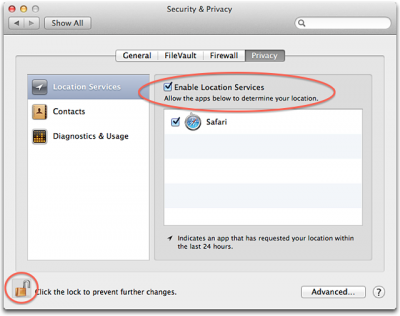
Location Services in OS X
Enabling Location Services
Follow these steps to enable location services in OS X Mountain Lion or later
- Choose System Preferences from the Apple () menu.
- Click the Security & Privacy icon in the System Preferences window.
- Click the Privacy tab.
If the padlock icon in the lower left is locked  then:
then:
- Click it & enter an admin name & password to unlock it

- Select Location Services.
- Check the “Enable Location Services” checkbox.
*Other mobile devices & web browsers should be similar to these fixes but may vary in execution. (Google or DuckDuckGo is your friend & a great option to find more device setting options ☺ )